There used to be a television channel that played science fiction. It was a terrific thing! They had Star Trek and Space:1999 and I kept hoping my family would get cable television so that I could watch my favorite genre on television.
Later, when I could afford it on my own, I got cable, mainly for the SciFi channel.
Now it's gone. Introduce SYFY.
I suppose it shouldn't be a surprise and perhaps it is time for the SciFi channel to Rest In Peace. They mainly play wrestling, fantasy and cheap "reality" shows where people chase ghosts and UFO's. Where's the science fiction?
Their highest rated and most acclaimed program was Battlestar Galactica but that's over. They didn't learn that there is a world-wide audience that is hungry for well-produced, intelligent science fiction based drama. They canceled Stargate Atlantis and have nothing really to take its place.
Last night they were playing one of the Pirates of the Caribbean movies.
I guess I'll have to make my own SciFi channel. Thank goodness for DVD.
Tuesday, July 7, 2009

Headline News
It has been weeks and STILL the headline news is: Michael Jackson.
CNN has become the Michael Jackson channel with his music as the fade out or between stories. I cannot understand why this weird pop singer with a fetish for youth and self-mutilation via surgery holds the media's (and presumably) most of America's viewer's interest.
Will they finally bury the story when they bury his body?
CNN has become the Michael Jackson channel with his music as the fade out or between stories. I cannot understand why this weird pop singer with a fetish for youth and self-mutilation via surgery holds the media's (and presumably) most of America's viewer's interest.
Will they finally bury the story when they bury his body?
Monday, December 1, 2008
Virtual PC
I started having trouble with IT at work and it was predictable, completely foreseen, since I use Windows Vista at home. My choice was due to the fact that so many of my customers were getting Vista on their new PCs. I wanted to have experience with the OS in order to help them continue using the PACS system at work ... that is only supported with Windows XP or Windows 2000.
So, I could either format my hard drive or install a virtual PC. Time was not a critical factor as I found another way (I talked the user through the problem over the phone) and either would be fine. The virtual PC would allow me a dry run at "down-upgrading" my PC anyway and I could delete the thing if it was not successful.
So, virtual PC it was.
I haven't tried vmware yet and virtual PC seemed easy enough. I just downloaded and installed the software from Microsoft and pulled out a couple of CDs for the installation.
I have a couple of versions of Windows XP, both Professional and Home versions that I have purchased over the years and I grabbed one of my XP Professional discs. I also did a quick Internet search for the Windows XP version of the driver controllers for my Hitachi hard drives. I figured that was the minimum I would need and perhaps I could add other drivers later.
The install was almost exactly the same as installing Windows XP on a PC, and boy was it sweet!
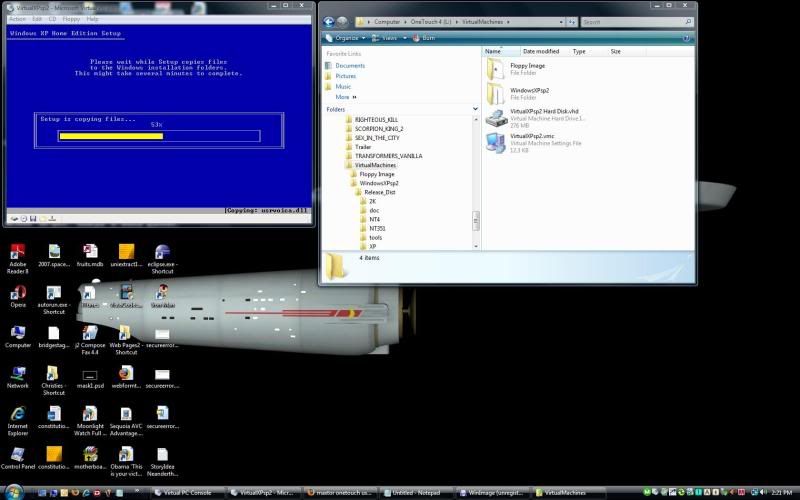
After that, I booted up the virtual PC ... all in a window!
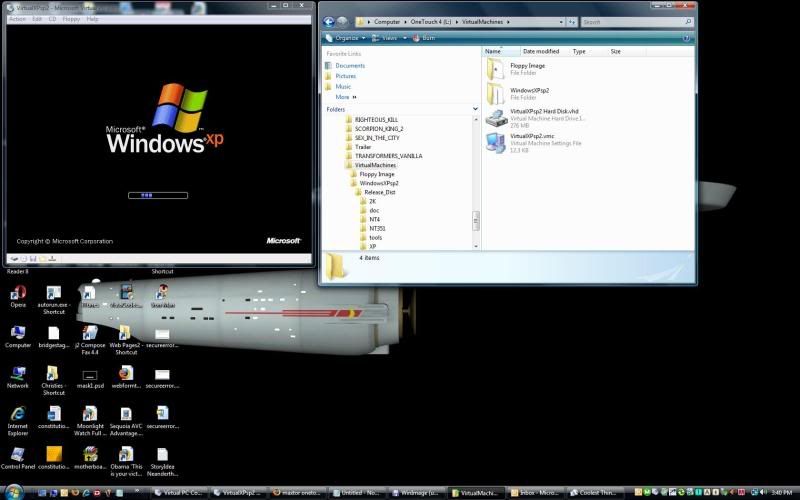
Best of all, if I call for support and they want a screen cap, all they're going to see is Windows XP Professional.
Sweet.
So, I could either format my hard drive or install a virtual PC. Time was not a critical factor as I found another way (I talked the user through the problem over the phone) and either would be fine. The virtual PC would allow me a dry run at "down-upgrading" my PC anyway and I could delete the thing if it was not successful.
So, virtual PC it was.
I haven't tried vmware yet and virtual PC seemed easy enough. I just downloaded and installed the software from Microsoft and pulled out a couple of CDs for the installation.
I have a couple of versions of Windows XP, both Professional and Home versions that I have purchased over the years and I grabbed one of my XP Professional discs. I also did a quick Internet search for the Windows XP version of the driver controllers for my Hitachi hard drives. I figured that was the minimum I would need and perhaps I could add other drivers later.
The install was almost exactly the same as installing Windows XP on a PC, and boy was it sweet!

After that, I booted up the virtual PC ... all in a window!

Best of all, if I call for support and they want a screen cap, all they're going to see is Windows XP Professional.
Sweet.
Tuesday, August 26, 2008


Sunday, August 17, 2008
This operation has been canceled due to restrictions in effect on this computer.
My Dad sent me an email. He had a problem with Outlook after he had installed, then uninstalled Firefox 3. Then he reinstalled Firefox 2 and started getting an error when he clicked on a link in Outlook.
--- Original Message ---
After reloading Firefox, when I click a link in Outlook I get an error message stating: “This operation has been canceled due to restrictions in effect on this computer. Please contact your system administrator.” I've looked at what I know to do but that's little regarding this message. What do you think?
--- End Message ---
I found the answer on a family blog!
The Luebbes: A Family Blog
The fix is really fairly simple. (Too bad I didn't know what to do! LOL!)
In XP: Start - Control Panel - Add Remove Programs
On the left side of the Window, choose Program Access and Defaults.
Open the currently selected and change the default web browser selection to another web browser.
Click OK.
Open Outlook and click on a link. It should open just fine.
--- Original Message ---
After reloading Firefox, when I click a link in Outlook I get an error message stating: “This operation has been canceled due to restrictions in effect on this computer. Please contact your system administrator.” I've looked at what I know to do but that's little regarding this message. What do you think?
--- End Message ---
I found the answer on a family blog!
The Luebbes: A Family Blog
The fix is really fairly simple. (Too bad I didn't know what to do! LOL!)
In XP: Start - Control Panel - Add Remove Programs
On the left side of the Window, choose Program Access and Defaults.
Open the currently selected and change the default web browser selection to another web browser.
Click OK.
Open Outlook and click on a link. It should open just fine.
Subscribe to:
Posts (Atom)
